August 6th, 2026
New Feature: Album Pages
The Album entity is now fully available within the Soundcharts platform.
This update includes:
New updates and improvements
The Album entity is now fully available within the Soundcharts platform.
This update includes:
Soundcharts has expanded data visibility with the launch of the Collaborator Audience section. Users can now access comprehensive demographic reports detailing the collaborator's audience across Instagram, TikTok, and YouTube, while tracking fanbase growth and evolution over time.
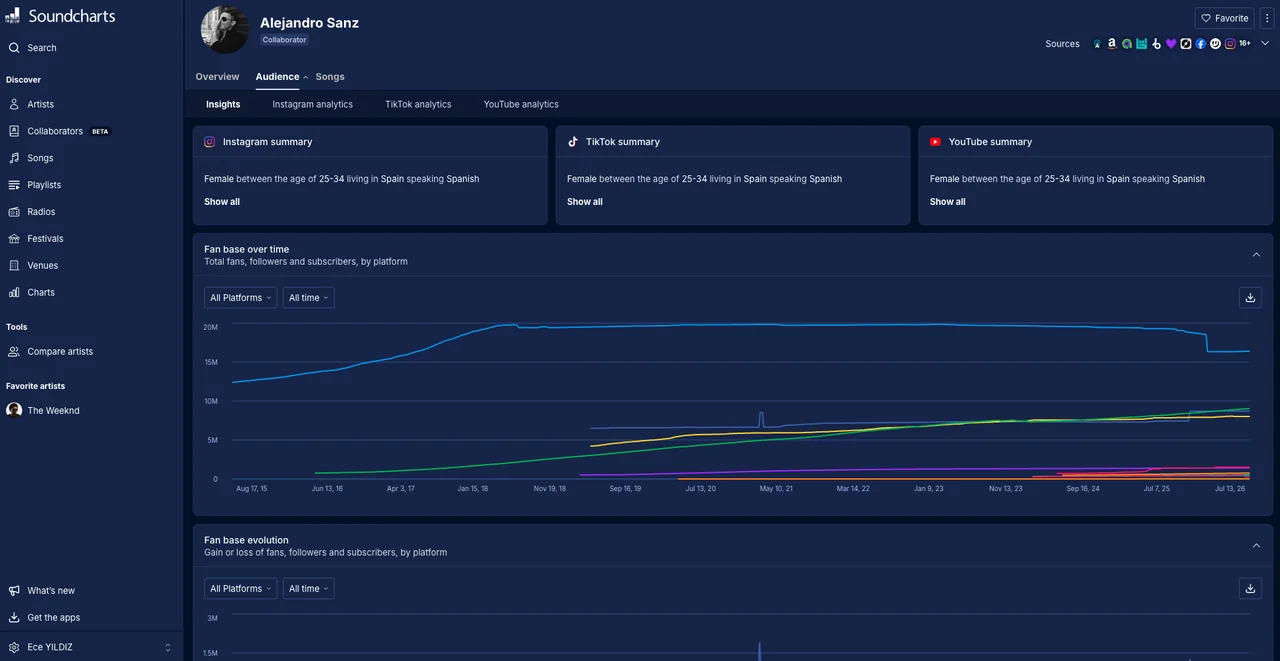
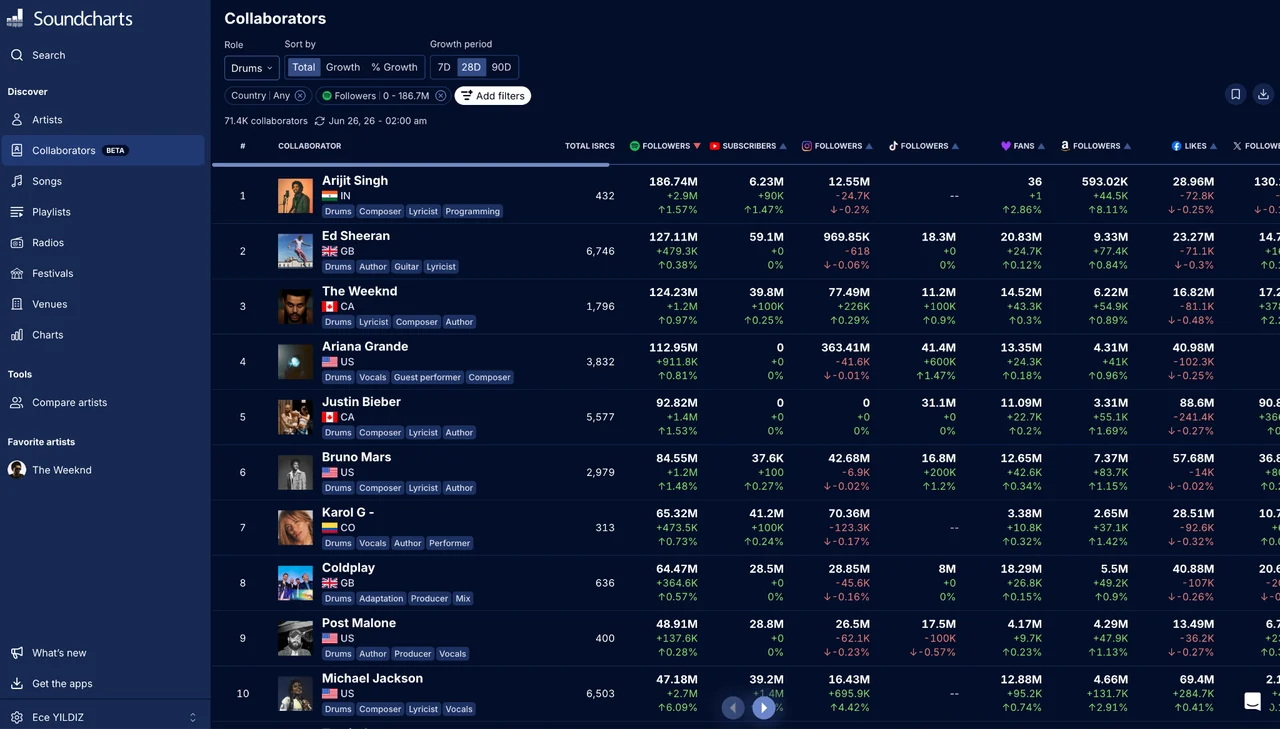
We have introduced dedicated Collaborator profiles to track the industry professionals, musicians, and writers who contribute to a song and earn royalties. Much like artists, collaborators can now monitor their personal performance, audience data, and market reach directly through the dashboard.
This launch includes a "Top Collaborators" ranking categorized by role and equipped with fanbase metrics. Additionally, full collaborator profile entities are now live, featuring an analytics overview, total fan tracking, and a complete catalog of their song contributions. A specialized collaborator search tool has also been integrated to streamline database navigation.
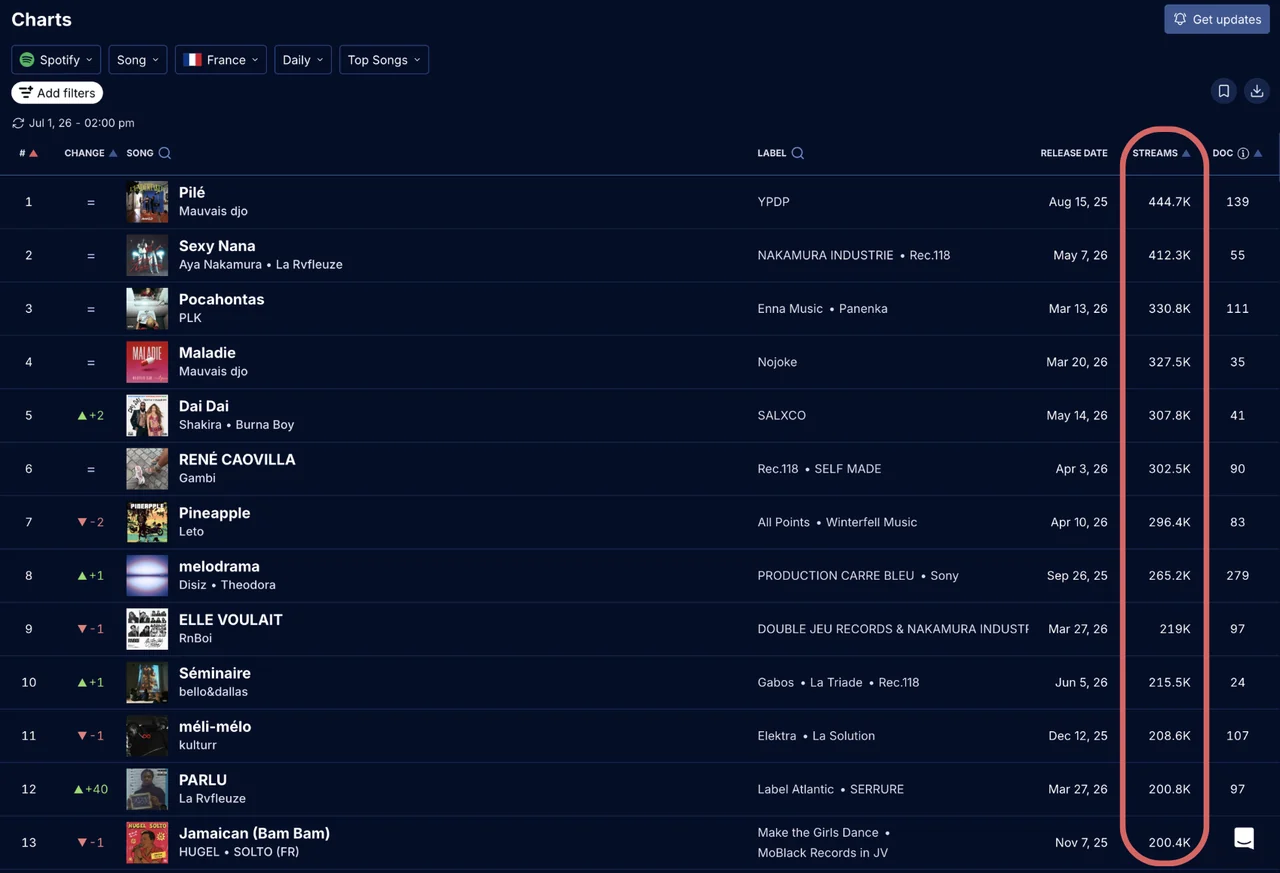
A new "streams" column has been integrated into our Song Charts rankings, subject to platform data availability. This update allows users to monitor exact streaming volumes for a song by country.
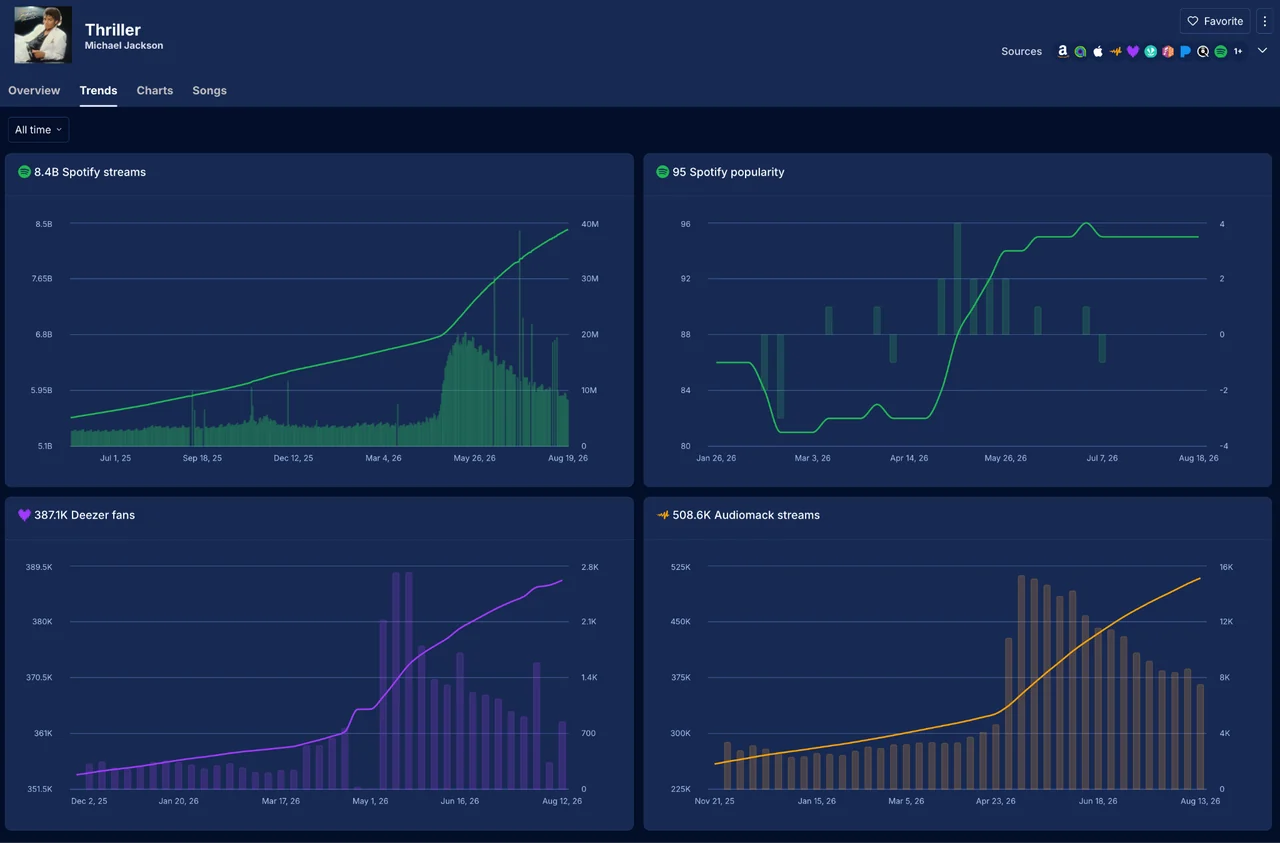
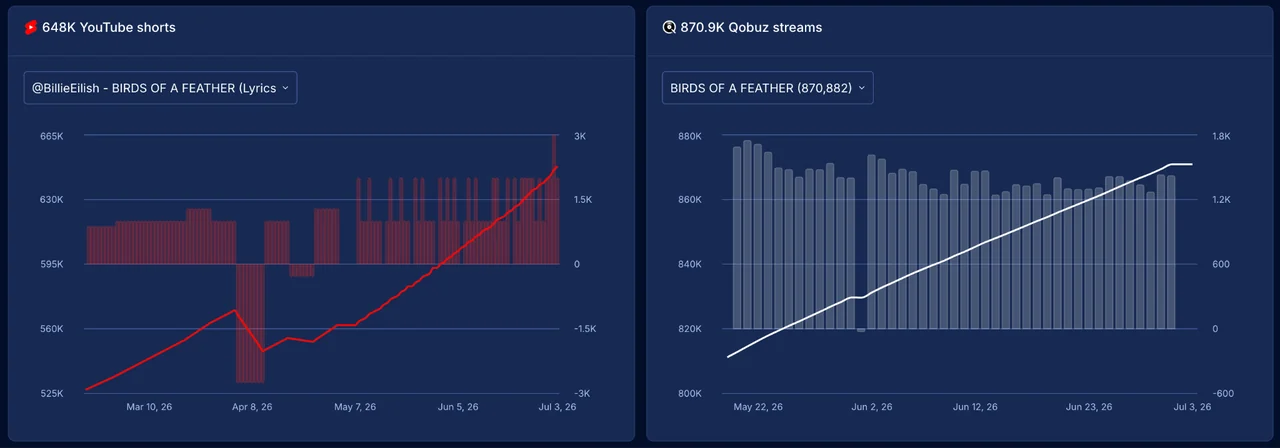
We have expanded our Song Trends analytics with the addition of YouTube Shorts performance metrics and Qobuz streaming data.
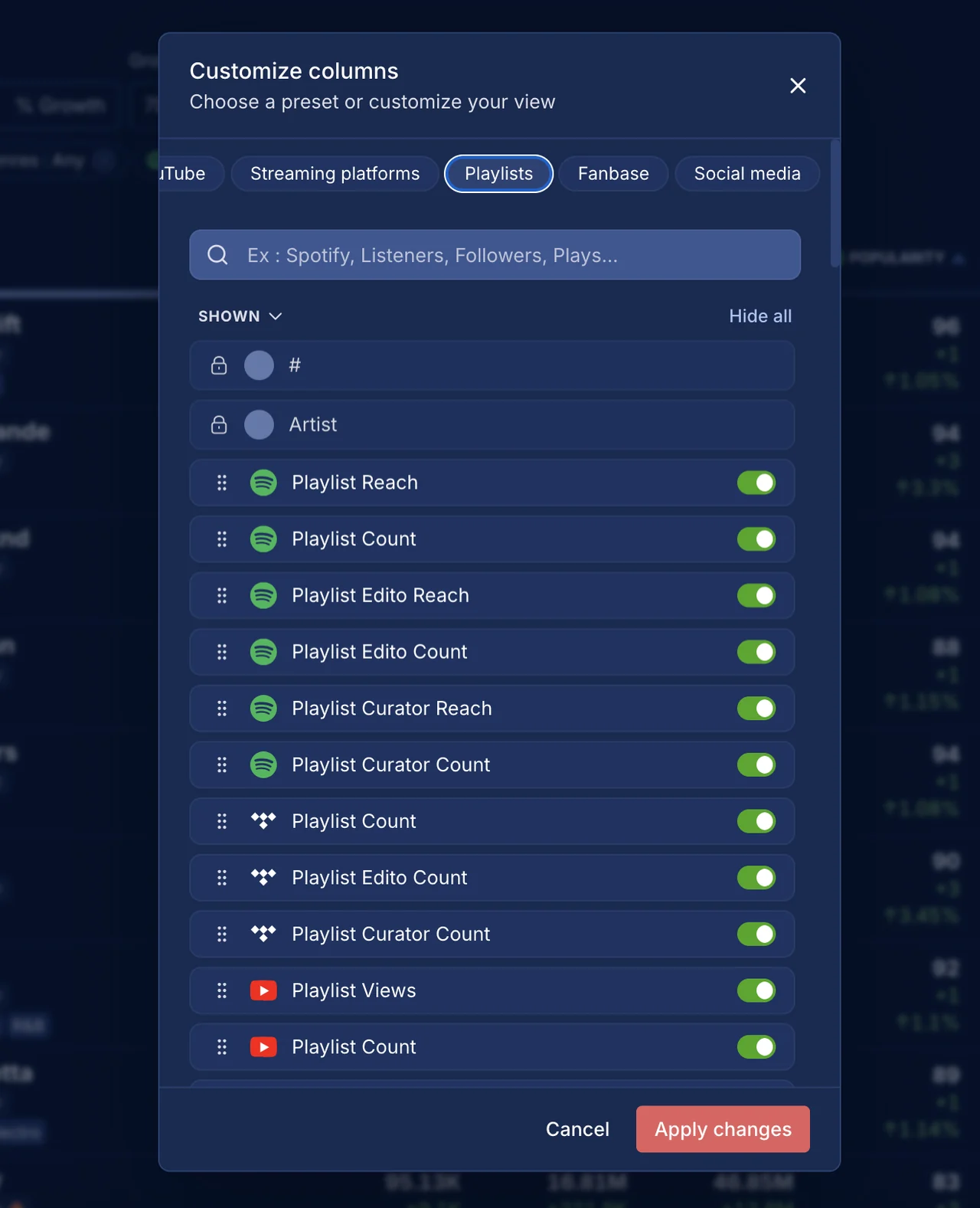
We added 60 playlist metrics spanning 19 different platforms in the artist ranking. To provide immediate insights, the default view now automatically includes:
Additionally, a new "Playlists" preset has been integrated into the Custom Columns tool, allowing users to instantly apply all relevant playlist tracking metrics to their dashboard layout. Try it out!
We have expanded our global chart coverage by integrating 10 new weekly rankings from Kugou. Check it out from here!
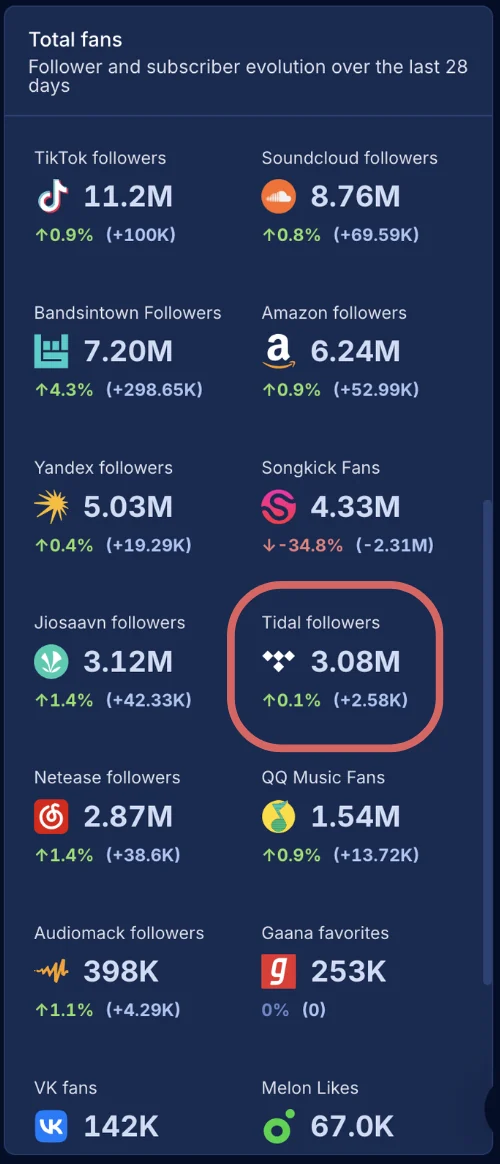
Tidal follower tracking has been integrated into the Artist Audience dashboard. Users can now monitor Tidal follower counts and historical growth alongside existing social and streaming platform metrics.
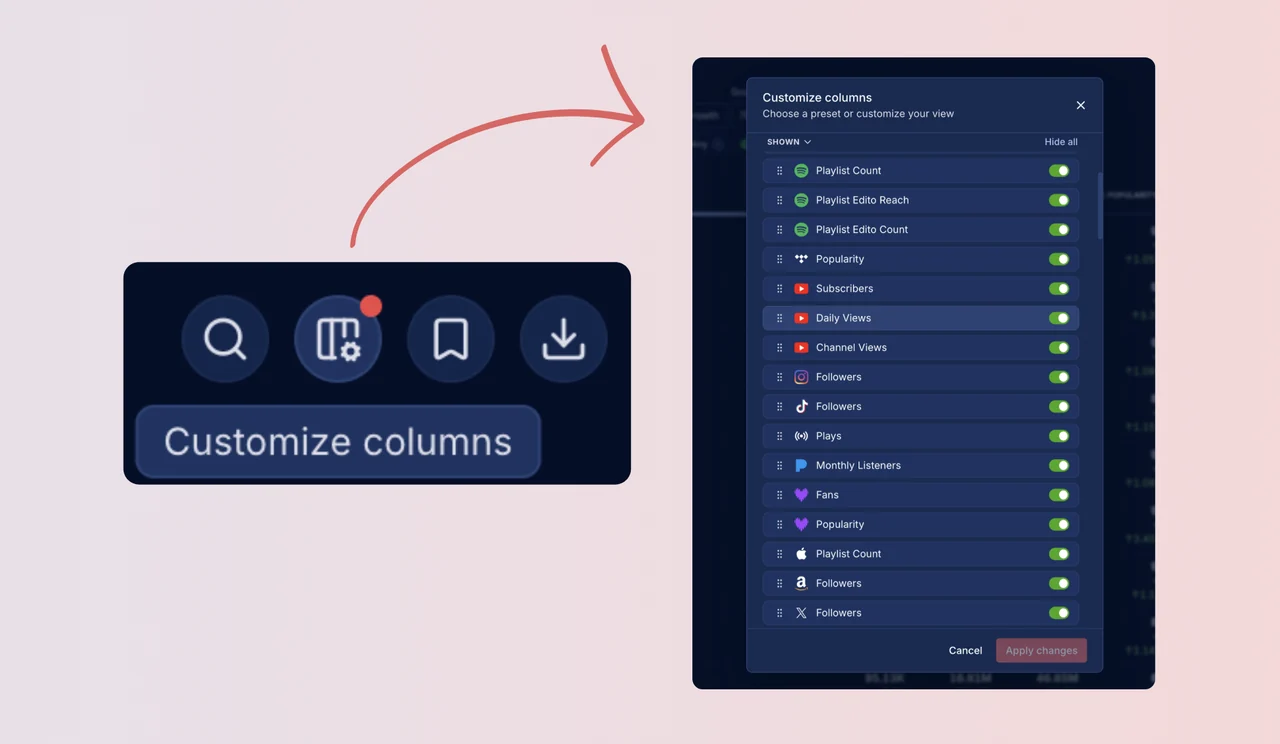
We have introduced a Custom Columns feature in the artist ranking view. Users can now fully personalize their dashboard layout by selecting only the metrics relevant to their workflow. This configuration is saved automatically, ensuring a consistent experience across all browsers and devices.
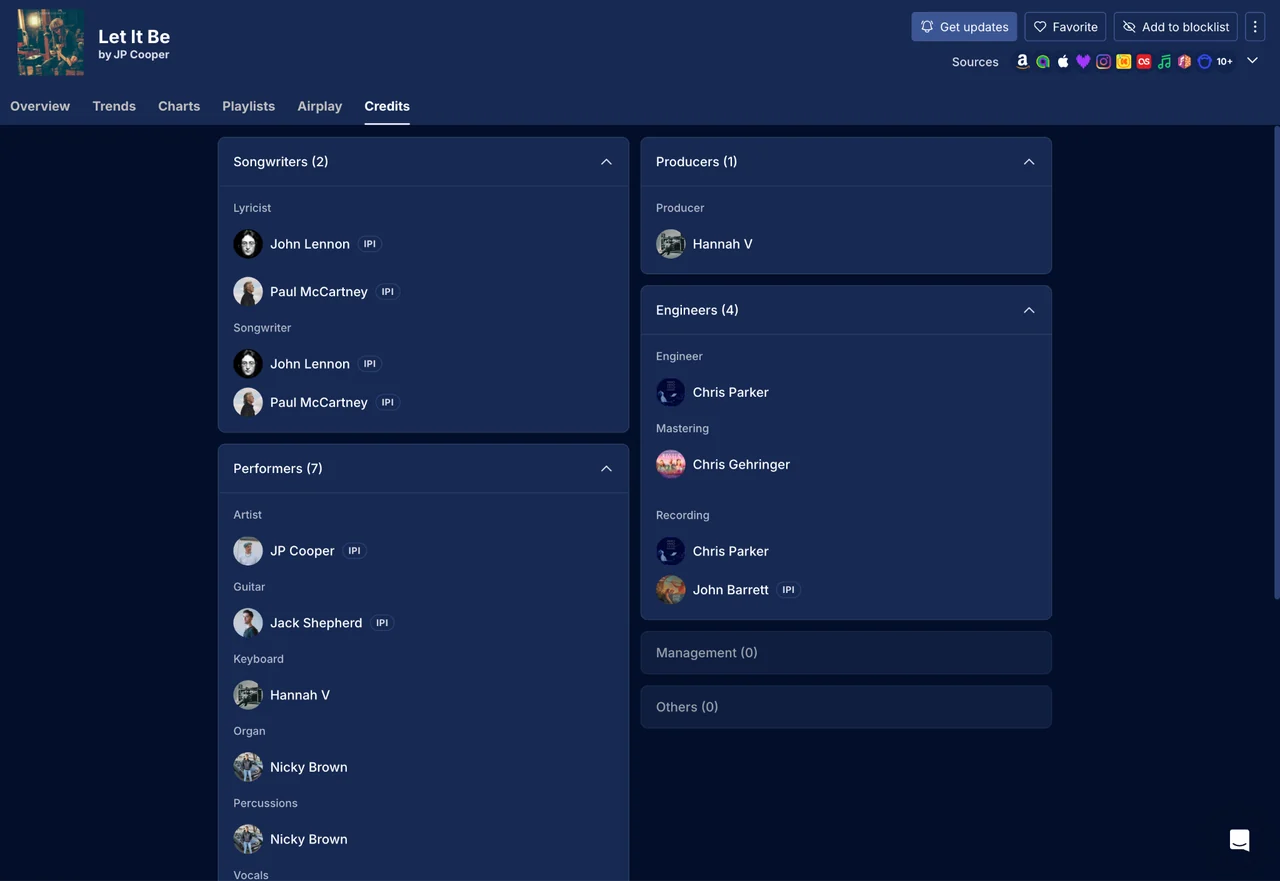
We have integrated comprehensive credits data for songs within the platform. This dataset aggregates both composition-level collaborators (authors, composers, and publishers) and recording-level contributors, including musicians and engineers.
This data enables music professionals to verify recording contributors and quickly identify rightsholders using their IPI numbers.
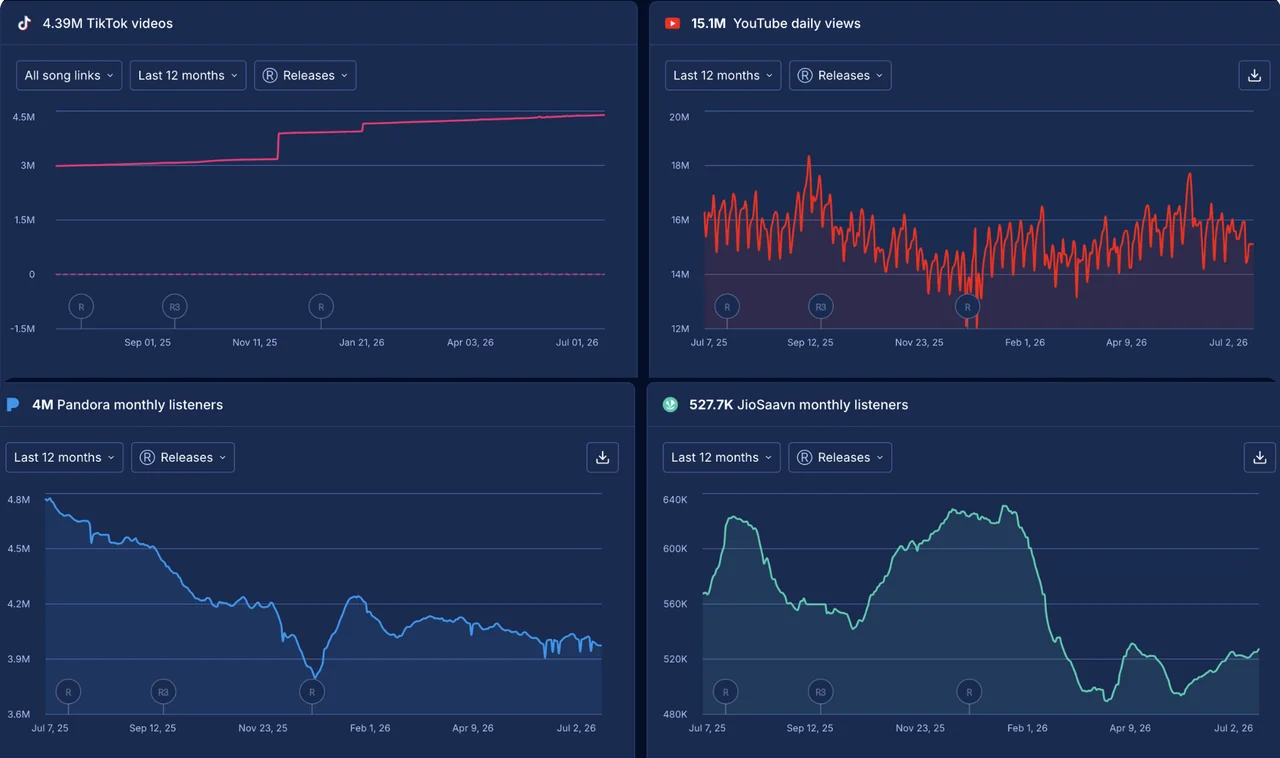
The artist audience dashboard now integrates more metrics. This includes:
Additionally, the TikTok videos metric has been relocated from the overview section to this dedicated audience view.
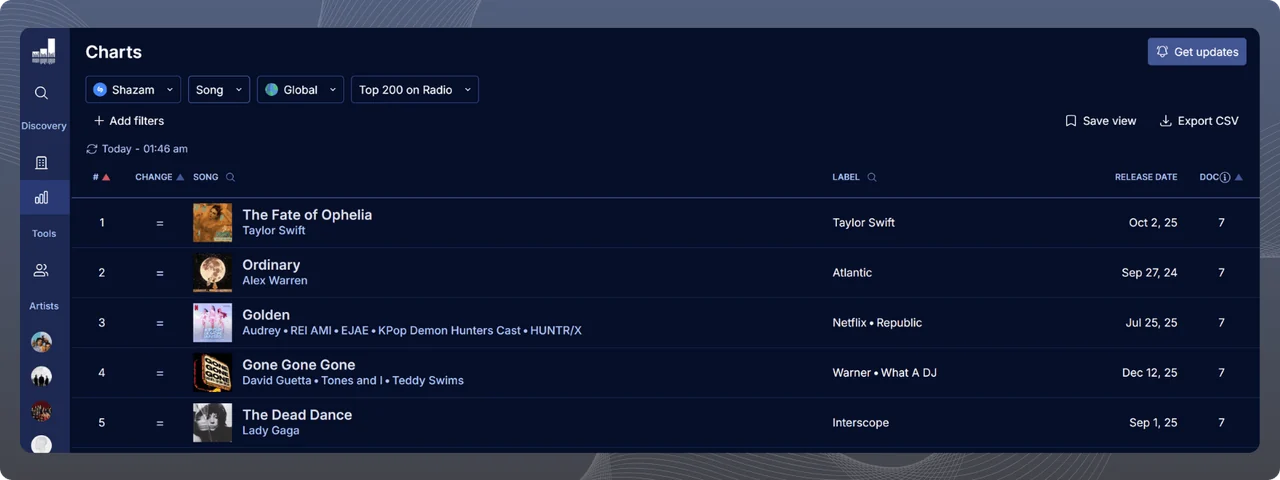
We are continuing to expand our chart coverage across the Asian market with the integration of official charts from AWA (Japan) and KuGou (China). This update gives you deeper visibility into regional momentum and helps you track daily performance in these key territories.
This update includes:
Building on the recent update to our Labels filter, we’ve expanded the "Include/Exclude" operator to the Distributors filter on the Song Rankings. This provides another powerful layer for refining your A&R searches and identifying truly independent artists.
By combining the exclude function on both Labels and Distributors (for instance, excluding major label groups alongside major distributors), you can cut through the noise and pinpoint emerging self-released talent with absolute precision. Try it out on the Song Rankings!
We’ve upgraded the Labels filter on the Song Rankings by introducing an "Include/Exclude" operator. This allows you to pinpoint specific releases with much greater accuracy and discover untapped gems.
For example, if you want to find purely self-released tracks, you can now simply exclude "Major" and "Indie" labels, effortlessly filtering out tracks tied to these label categories.
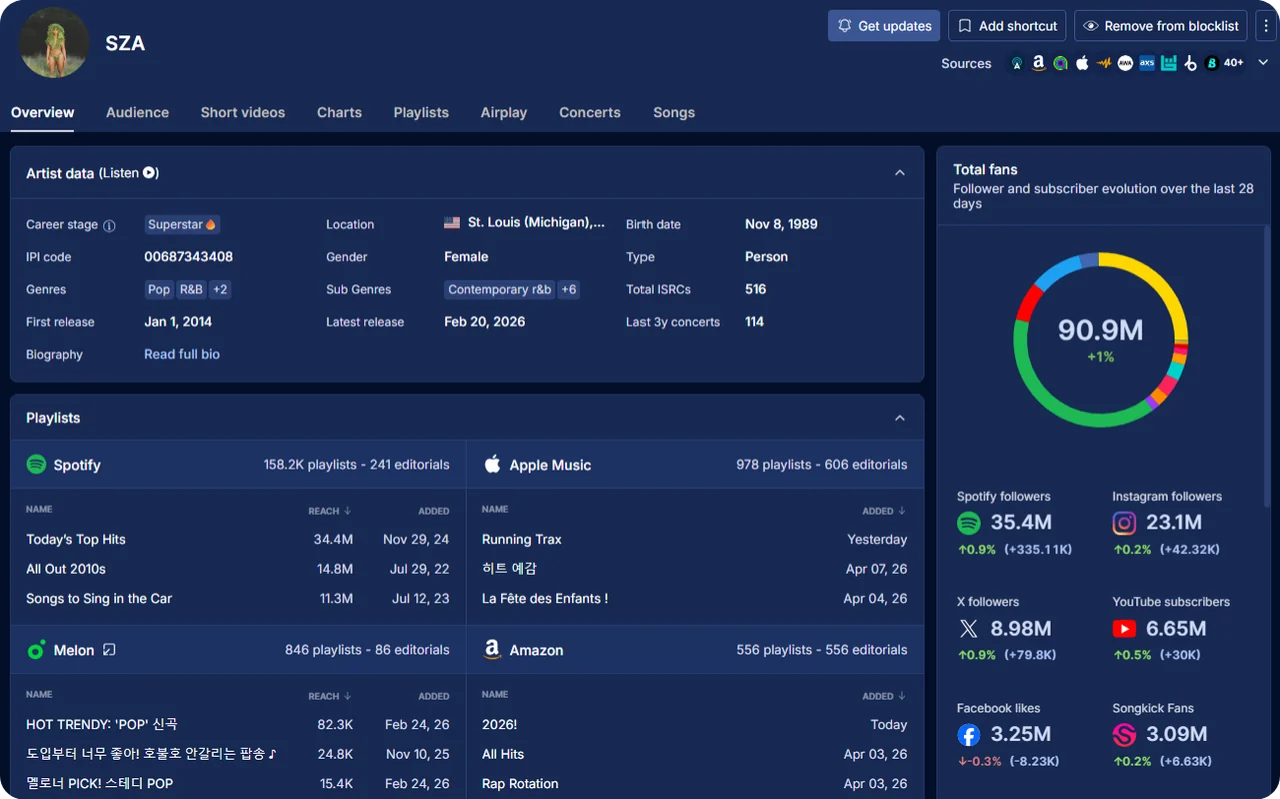
We’ve completely redesigned the Artist and Song Overview pages to make data more accessible, customizable, and easier to digest. The new responsive two-column layout is designed to reduce noise so you can focus exactly on the insights that matter most to you.
New data:
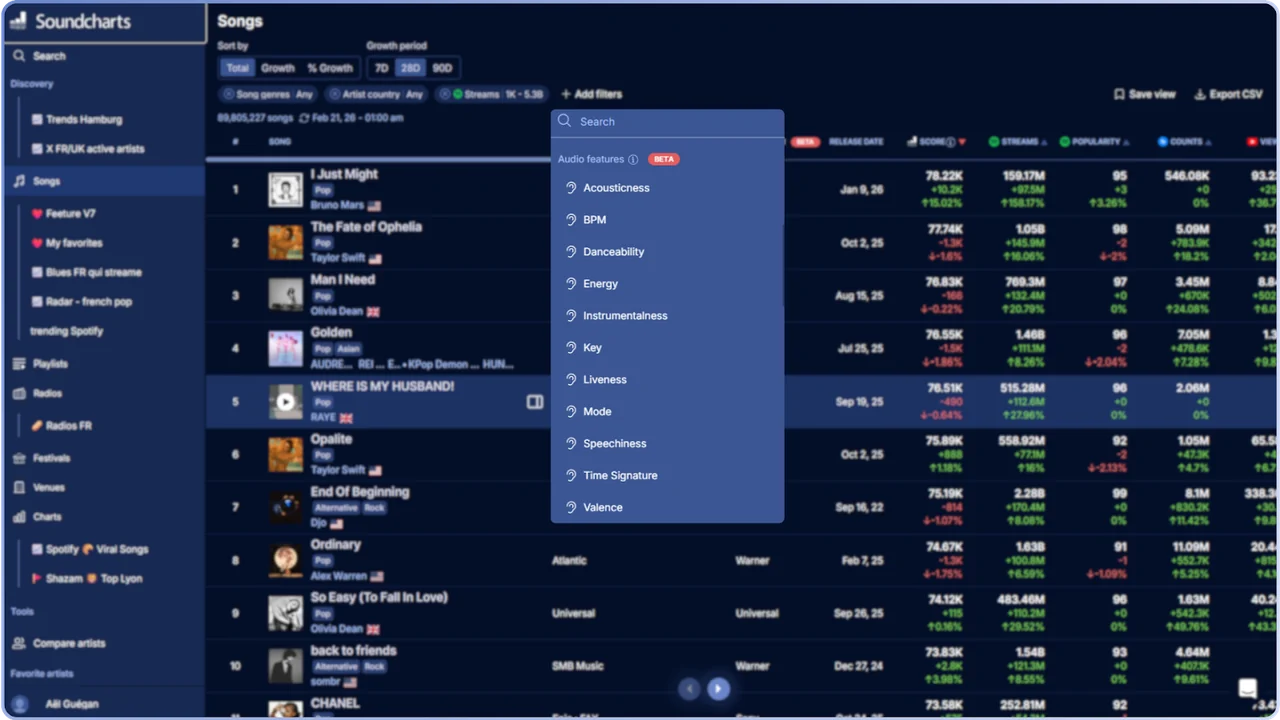
To support more granular music discovery, we integrated a full suite of audio metadata into the Songs Ranking:
These features are now visible in the song's right sidebar, and the concatenated Key/Mode is displayed on the Song Overview.
All new audio metadata is included in CSV exports for deep-dive catalog analysis.
We updated the sidebar to give you more control over your saved views. You can now rename or delete any Ranking or Chart added to your favorites.
For favorited Charts, a new toggle in the left panel tooltip lets you activate or deactivate discovery alerts.

We have integrated three key sources into Song Trends to refine your post-release audits and audience quality assessments:
These metrics now feed our proprietary Soundcharts Song Score, providing a weighted view of market viability and ROI.
We have integrated the Soundcharts Score directly into the Song Trends view. This update allows you to cross-reference real-time momentum with specific performance peaks, making it easier to benchmark artist growth and identify high-potential tracks early.
Read more about our scores in our help center.
We are expanding our short-form video tracking by integrating Instagram Reels metrics directly into the song insights. You can now track the number of Reels created per Instagram Audio. This data is available in the Song Overview and within the Trends tab.
We launched a fully optimized version of our Top Rankings for mobile browsers.
Artists, Songs, Playlists, Radios, Festivals, and Venues rankings are now available via mobile browsers with a dedicated UI.
You can now keep the artist or song name in view while scrolling horizontally through metrics. A new "Add Filters" menu is organized by category (Song attributes, Metrics, Lyrics analysis).
We now track the primary language of 8.5M+ tracks using AI-powered lyrics analysis, allowing for deeper catalog segmentation.
This update includes a new filter on the Song ranking covering 104 languages. The detected language is also visible in the Song profile overview. We’ve merged duplicates and mapped local variations to primary languages (e.g., Canadian French is now grouped under French) to improve reporting clarity.
We continue to expand our coverage of the Asian market by integrating AWA, one of Japan’s leading streaming platforms (10% of the Japanese DSP market).
You can now track Artist Audience (Favorites) and Song Metrics (Streams) for AWA.
We also added AWA icons and direct URL support in the "Edit Source" section for artists and songs.
We've significantly expanded our playlist coverage — to monitor placements and discover playlists far beyond the usual Western DSPs, with much stronger reach across Asia.
Newly added platforms are Audiomack, Joox, KKbox, Kuwo, Line Music, Melon, Pandora, Qobuz, QQ Music, SoundCloud & Yandex.
This update unlocks:

We now monitor new Soundcloud, Audiomack, KKBox, Pandora, Joox, Yandex & Shazam charts across 103 territories.
This update includes:

We've connected the DSPs & ticketing websites to our app & API.
You can now centralize these links on artist profiles.
Kuwo followers are now available in the artist overview.
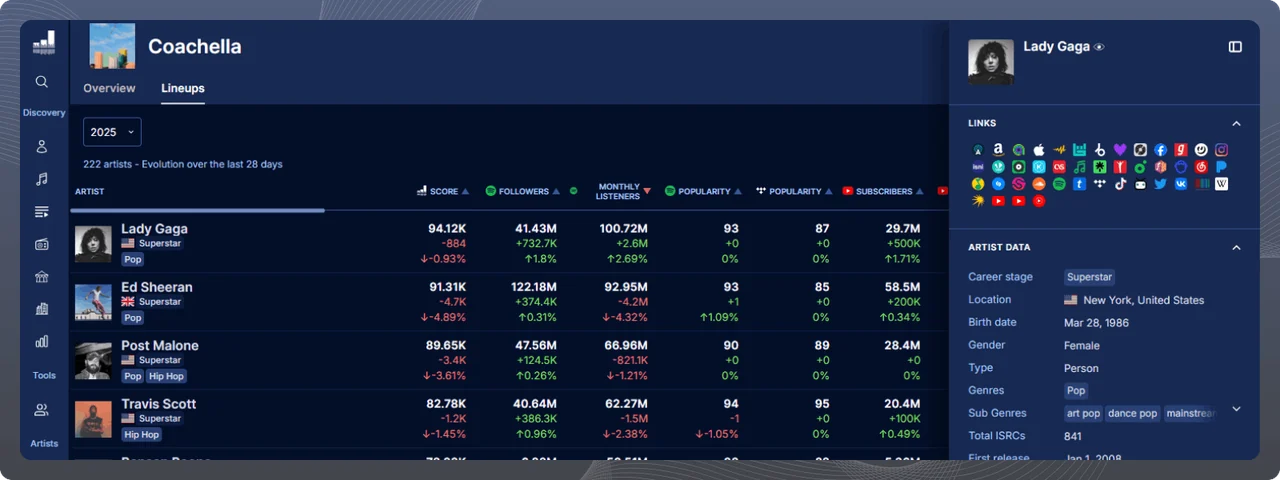
We've added lineups to festival profiles for each edition, giving you a deeper view of who's performing and how they're trending.
This upgrade includes:
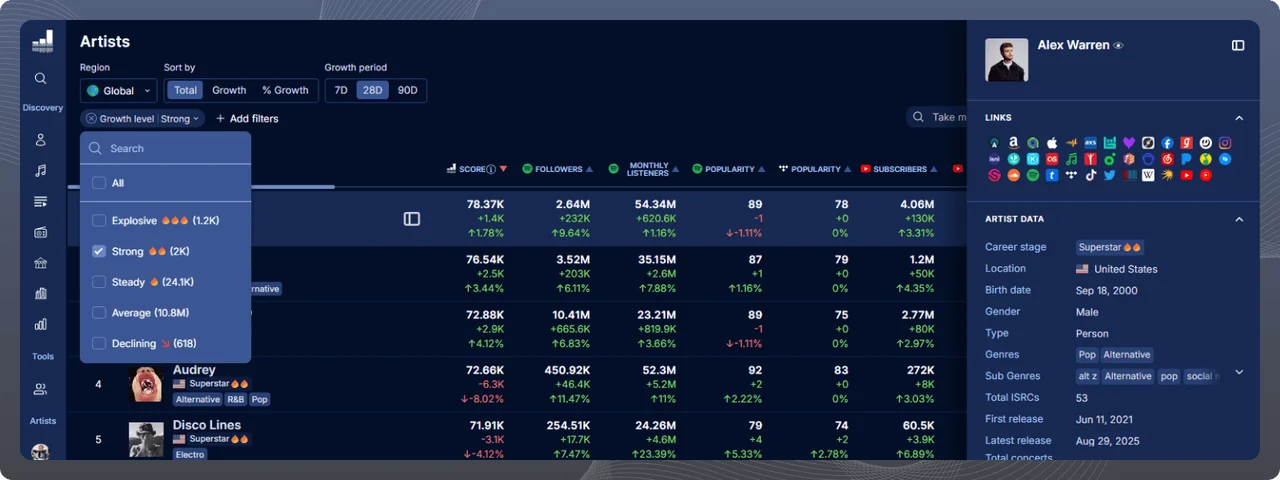
We've added a new Growth Level metric to highlight how an artist's momentum is evolving over time. The level is calculated from the Soundcharts Score over the last 13 weeks.
New growth levels include:
We've also added a new filter in the Artist Rankings, so you can quickly target artists by their Growth Level.
We've connected three new smart links and marketing platforms to Soundcharts.
You can now centralize these links on artist profiles.
New platforms include:

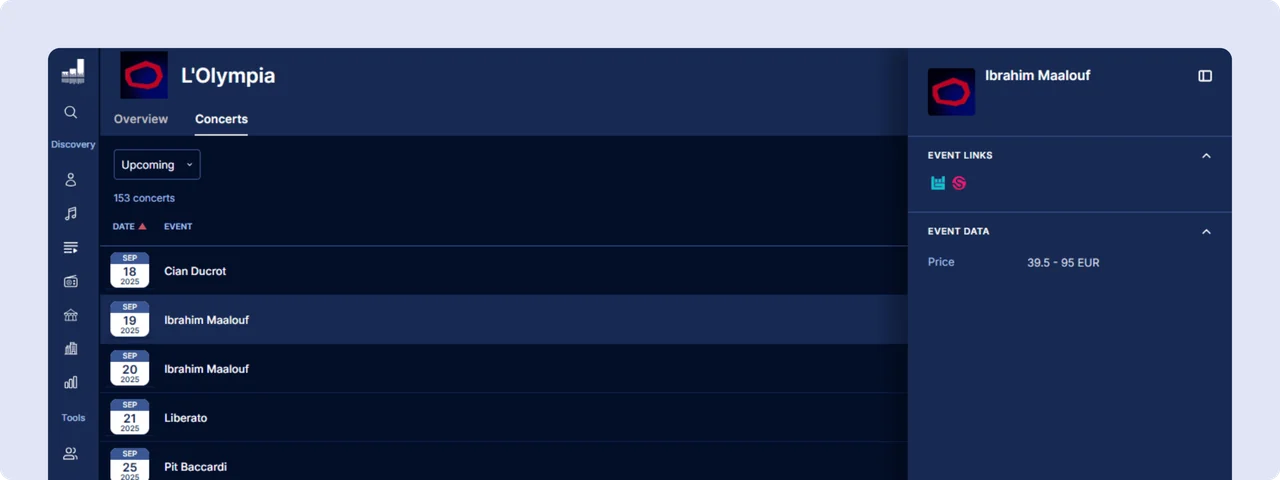
We've added a dedicated Concerts tab to venue profiles, giving you a complete view of live events happening at each location.
This new tab features:
You can now refine Song Rankings using artist-level filters — making it easier to target specific profiles across 62M+ tracks.
New filters include:

The Concerts tab on artist profiles shows every show from every major platform. Filter by type, date, or country, view full festival lineups, and explore event details in a new sidebar.

We now track regional TikTok charts, including Breakout (the fastest-growing songs) and Popular (the most popular tracks).
This update includes:

JamBase is a live music and concert discovery platform focused on jam bands, indie artists, and live performance culture. Popular in North America, it helps fans find shows, track touring artists, and explore festival lineups, making it a key source for tracking grassroots touring activity.
You can now link songs on Soundcharts to their KKBOX pages—centralize all streaming links in one place!

Patreon is a membership platform that connects creators with fans who support their work through monthly subscriptions. Widely used by musicians, podcasters, and visual artists, it enables artists to monetize their fanbase directly and share exclusive content with paying supporters.
You can now track Patreon followers and posts directly within Soundcharts!
We've added 10 new metrics, expanding tracking to 59 total metrics across 34 platforms!
New metrics include:

We've added 2 new metrics, expanding tracking to 16 total metrics across 15 platforms!
New metrics include:


We've added a search bar to the Artist Rankings — so you can look up any artist and instantly see where they stand across global or local metrics, based on the filters you've applied.
No more endless scrolling — jump straight to an artist's position.
After months of collecting, cleaning, and matching data across multiple sources, we're proud to launch two new discovery tools (Beta): the Festivals Ranking and Venues Ranking.
These new rankings offer a fresh way to explore the live music landscape — from global hotspots to local gems. Each festival or venue is scored based on the Soundcharts Score of the top 100 artists who've played there.
Like in other rankings, you can filter, sort, export, and save views. Available data includes:
Access both rankings from the Discovery panel. Updated weekly.

TuneIn, one of the most popular internet radio platforms, lets users follow their favorite stations and discover live audio from around the world. It reaches millions of listeners across North America, Europe, and beyond.
You can now track TuneIn subscribers for radio stations directly within Soundcharts!

KKBOX is an Asian music streaming service, especially popular in Taiwan, Hong Kong, Japan, and Southeast Asia. It's a key platform for tracking fan engagement in Mandarin and regional music markets.
You can now link songs on Soundcharts to their KKBOX pages—centralize all streaming links in one place!

Weibo is one of the largest social media platforms in China, with over 580 million monthly active users. It plays a key role in music promotion, especially for C-pop artists and international acts with a Chinese fanbase.
You can now track Weibo followers directly within Soundcharts!

NetEase Cloud Music is one of China's leading music streaming platforms, used by millions to discover both local and international music.
You can now track NetEase Cloud Music followers directly within Soundcharts—and explore three official charts from the platform:

We're introducing Distributor metadata (Beta), now visible across key pages and filters, to help you better understand release strategies and rights ownership.
Distributor metadata is now available on:

We've added a period dropdown on the Short Videos section of the Artist pages, giving you more control over analyzing performance over time.
You can now filter videos by custom periods (e.g. post-release) to spot trends and evaluate short-form impact at key moments.
We've added 7 new artist data points to give you a deeper snapshot—directly from the artist overview and sidebar.
New artist data includes:
We've made genre, theme, and other tags clickable on Artist, Song, and Radio Overview pages, making it easier to dive into filtered charts and discover similar content.
Clicking a tag instantly redirects you to the relevant Artists, Songs, or Radio ranking, already filtered by the selected tag.
Now clickable:
We've added 13 new metrics, expanding tracking to 47 total metrics across 29 platforms!
New metrics include:

We've extensively upgraded the Artist Ranking, adding robust new filters to search by artist influence, growth, and activity.

We're introducing the Soundcharts Artist Score (Beta)—a new metric designed to measure an artist's influence and momentum. Quickly assess an artist's industry standing with a single, powerful score.
How It Works:
The Soundcharts Artist Score is built from two key factors:
These two scores combine into a final Soundcharts Artist Score (0-100), which determines an artist's Career Stage:

We are introducing 12 new filters on the Song Rankings, building on our previous Lyrics Analysis update.
These filters provide precise targeting options, offering more profound insights into lyrical characteristics and helping you identify songs that resonate with specific audiences.
New filters include:
Lyrics Analysis filters are also available through CSV exports!

We've enhanced our song preview feature, making it more accessible across Soundcharts.
Previously available on song rankings, charts, and playlists, song previews are expanding to artist pages. On an artist's page, you can listen to a preview of their most trendy song.
Song previews are now available on

We're now using artificial intelligence (AI) to analyze lyrics. This innovative feature provides an overview of a song's content, impact, and references, offering valuable insight into a song's potential resonance with audiences.
Available metrics:
Access Lyrics Analysis on song pages, the right sidebar of song ranking, and via our API.

We redesigned our Right Sidebar to improve readability, organization, and provide easy access to key information.
It now offers a quick overview of songs, artists, albums, playlists, or radios.
To access Right Panels:
Artist ranking filters now display the total number of artists each filter item represents.
Affected filters: Artist Country, Artist Genres, and Artist Sub-genres.

Note: The count is unaffected by other active filters
Users can now request to synchronize an artist's discography on the Artist songs page.
If any songs are missing from an artist's catalog, click the "Sync catalog" button in the top-right corner of the songs table to initiate an update.
Note:
Users can now export the artist's song list and associated metrics from the Artist's Songs page.
To export, click the "Export CSV" button at the songs table's top-right corner.

If you notice any missing songs, click the "Sync catalog" button, and the songs will be added within 24 hours.
We've added five new platforms to the Artists ranking, increasing your ability to track artist reach and engagement.
You can now filter and sort Artists by a total of 36 metrics across 29 platforms.

If you're missing data for any artist, song, or playlist, just add relevant source link on your dashboard, and we'll begin tracking it!
The "Short videos" tab on the Artist profile now shows short-form video content from Instagram (Reels) and YouTube (Shorts).

If you notice any missing data, add the missing links and we'll start tracking it for you!
Following our Artists, Songs, Radios, and Charts rankings, we are thrilled to announce a major update: the final installment of our "Discovery" features, introducing Playlist Ranking.
Supported platforms include Amazon, Apple Music, Boomplay, Deezer, Gaana, Jiosaavn, Spotify, Tidal, and YouTube.
Available filters:
Like our other rankings, you can sort audience by total, absolute growth, or relative growth.
Once filtered, you can save the view and export up to 50,000 rows of data in CSV.
ISRC (International Standard Recording Code) identifies sound and music video recordings globally, with the first two letters showing the country of origin.
The new "ISRC" filter lets you see where songs were produced. It's multi-select like the "Artist Country" filter, with options to:
The filter is available on the Songs Ranking.
We are excited to announce a significant enhancement to curation on Soundcharts: you can now listen to song snippets directly from our song lists, making music and artist discovery more effortless than ever.
Available on:
Simply hover over a song cover, click the "Play" icon, and enjoy a preview.
This feature is only available on desktops (screens over 900px).
If no snippet is available, you'll see an info message instead.
Amazon Music is a leading music streaming platform, serving over 32 million monthly active users. It is primarily used in North America and Europe.
You can now track Amazon followers directly within Soundcharts!

If you notice any missing artist, song, or playlist data, add the Amazon Music link on your dashboard and we'll start tracking it for you!
Vkontakte, commonly known as VK, is a popular Russian social network. Similar to Facebook, VK allows users to connect, share content and discover a variety of media, including music. It serves X millions monthly users in Russia and neighboring countries.
You can now track VK fans directly within Soundcharts!

If you notice any missing artist, song, or playlist data, add the VK link on your dashboard and we'll start tracking it for you!
We've recently rolled out major UX/UI upgrades to Soundcharts, enhancing information hierarchy and readability for a cleaner look on Tops, charts, and playlists. These updates, driven by your feedback, reflect our commitment to continuously improving your experience and making our features more intuitive. Check out what's new:

Explore these updates now and enjoy a smoother, more intuitive experience on Soundcharts!
TVmaze is a comprehensive database providing detailed information about TV shows and web series.
TuneFind provides detailed information about songs featured in TV shows and movies.

Just like other platforms, you can submit links to these platforms on artist pages.
Twitch is a live video streaming service serving 140 million daily users. Initially focused on video games, it has since expanded to include a wide range of content, including music.
You can now track Twitch followers directly within Soundcharts!

If you notice any missing artist, song, or playlist data, add the Twitch link on your dashboard, and we'll start tracking it for you!
Mixcloud is a collaborative music platform, dedicated to sharing and discovering music mixes, radio shows, and podcasts.
You can now track Mixcloud followers directly within Soundcharts!
This metric is also available on our API and mobile apps.

If you notice any missing artist, song, or playlist data, add the Mixcloud link on your dashboard, and we'll start tracking it for you!
Yandex Music is a leading Russian streaming platform developed by Yandex, serving 20 million monthly users primarily in Russia and neighboring countries.
You can now track your Yandex followers and monthly listeners directly within Soundcharts!
These metrics are also available in the artist ranking and can be used to filter the results!

If you notice any missing artist, song, or playlist data, add the Yandex link on your dashboard, and we'll start tracking it for you!
Pandora is a major US streaming platform serving 46 million annual users, known for its innovative automatic music recommendation service based on the Music Genome Project.
You can now track your monthly listeners on Pandora directly within Soundcharts!
These metrics are also available in the artist ranking and can be used to filter the results!

If you notice any missing artist, song, or playlist data, add the Pandora link on your dashboard, and we'll start tracking it for you!
We've completed our focus on radio by integrating radio stations into the search bar.
You can effortlessly access any specific radio station's overview, charts, and live feed by searching for its dedicated page using our search bar, just like you do for artists, songs, and playlists.
We're excited to announce the addition of the Radio Live Feed tab, providing real-time updates from radio stations.
Key features:
Display fields: Song, label, release date, duration, local time, and UTC of broadcast.
For accounts with restricted access:
Upgrade your account to unlock the full potential of our radio live feed.
We are introducing new metrics in our artists and songs rankings.
Artists ranking:
Songs ranking:
If some artist/song data is missing, add Audiomack and Last.fm links on the dashboard, and we'll start tracking it.
You can now enhance artist profiles by adding links to Bandcamp and AllMusic.
We are now tracking YouTube Music as one of our connected data sources. You can find:

If some artist/song/playlist data is missing, add the YouTube Music link on the dashboard, and we'll start tracking it.
The following metadata have been added to the Artist's about:

On the artist's song list, we've added the metrics of their songs available on the top songs, with the ability to:
Songs are now ranked by streams rather than release date, but you can still sort them by any song audience metric.
Through our radio ranking, you'll get insights about a radio's:
You can also save your favorite radios in your left panel!
We added 6 daily charts & 14 weekly charts to our tracking.
The following metrics have been added to the Artist Ranking:
In addition, Melon likes have been added to the song ranking.
The following platforms have been added to the chrome extension:
Last of the three updates of the day: Joox and QQ Music are now available on Soundcharts! Just like other platforms, you can submit links to these platforms on artist and song pages.
Joox followers and QQ Music fans are available on artist's overview as well as the artist ranking.
Our new Radios Ranking, available in the dashboard and in the API, allows you to sort the 2300 radios we track in over 90 countries according to various metrics. It is refreshed every Monday. Clicking a radio will display its metadata and connected data sources!
Available metadata:
Available metrics:
Like our other rankings, you can sort these metrics by total, absolute growth or relative growth.
You can also save your favorite filters, and export the ranking to CSV.
We're now tracking one of the leading platforms in South Korea! Get data for:
If some artist/song/playlist data is missing, add the Melon link on the dashboard, and we'll start tracking it within 24 hours.
This data is also available in our API.
Explore how releases and concerts shape an artist's career with our enhanced Audience and Airplay graphs. Each event is now marked for quick reference:
Hover over the markers to see details about the event and its influence on the artist's fan base and airplay. This intuitive visual tool allows you to correlate spikes in fan activity with specific career milestones, giving you deeper insights into the artist's growth and audience response.
The Cities Top 25 Apple Music charts are available! You can find them under "Genres" after filtering to the country of your choice, similarly to Shazam. Here's the one for Paris as an example.
These charts are updated daily - all rankings since March 5th are also available in the API.
You can now :
We added the tracking of:
First batch of imports:
You can now filter our artist ranking by subgenre! Simply click "Add filters", then "Artist sub genres", and select the subgenre(s) you want.
You can now submit updates to the following information on an artist's overview:
To do it, click the "Edit profile" button, fill in the appropriate information and click "submit". Our team will review your submission within a couple of days, after which it will be visible on the platform.
You can now search for a playlist using its name or URL, no matter what platform it's on.
The language can be changed in your preferences.
You can now focus on specific cities to rank artists by their social media performance: simply select the relevant country, then search for the city to get a localized artist chart.
Available metrics are:
Please note that similar to the country chart, we generate the city chart using artists' top city rankings for the platform.
As a result, the artists listed are not always the most listened to in that region but rather those with whom that city is a top market.
You can now search for:
You can now use the favorites filter in charts and playlists to quickly access performances of your entire roster at a glance. Use this filter to review only artists and songs listed as favorites in any chart or playlist!
Learn more about blocklists and filters.
Credit availability is now displayed in the right column when viewing unlocked artists.
Reminder: to view unlocked artists, click on your name in the bottom left corner and then on "Artists". To learn more about credit management, go to our FAQ.
We're adding a major upgrade to our global artist chart: you can now focus on any market to rank artists by their social media performance. 📈
Available metrics are:
Implement custom filters to refine your analysis and find your sweet spot for talent discovery. Once you get the perfect formula, export the listing to CSV and save the parameters in your favorites!
Test the country artist chart feature!
We're now tracking one of the leading platforms in Africa! Get data for:
If some artist/song/playlist data is missing, add the Boomplay link on the dashboard, and we'll start tracking it within 24 hours.
These data are also available in our API.
Set up filters and save your custom artist chart as a shortcut to access it in a single click. Spend less time configuring filters and focus on your analysis!
To save your custom artist chart, click the heart in the header to add a shortcut in the artist section of the left panel.
Example: save the chart of your "favorite artists" as a shortcut to see your entire roster at a glance.
The following metrics have been added to the artist chart:
These new metrics are available in the chart''s columns, in CSV data and as audience filters.
Learn more about an artist or a song thanks to new information.
For artists:
For songs:
Moreover, you can now visualize all the data sources connected to an artist or song.
We're pleased to introduce our 10 Artists plan!
This plan is tailored to the needs of small and medium-sized businesses. It enables the tracking of up to 10 artists thanks to a system of credits similar to the Artist plan. It's a great fit for managers and record labels aiming to monitor less than 10 artists.
With the 10 Artists plan, explore complete artist analytics for USD 49/month or USD 490/year (2 months for free). Get access to charts, playlists, radio plays, and audience metrics for the artists you monitor. Set alerts and reports for your roster and export data to CSV to build clean reporting.
Discover how the 10 Artists plan works.
Please note that this plan does not enable access to the compare and discovery tools.
Save time by gathering all audience data from your favorite artists in a few clicks.
With the new "Favorites" filters, quickly access performance on social media and DSPs of all artists you've set as favorites. Stay focused on how the artists you monitor perform by using sorts and filters available in the artist chart.
Takeaway: You can export displayed data in .csv for the internal reporting of your roster.
We're now tracking the leading platform in the Middle Eastern music streaming market! We were already tracking charts, and we now get:
To see the number of followers for an artist, go to the Overview.
Also, to get the play count per song, go to the song's Trends section.
If follower/plays data is missing, add the Anghami link on the dashboard, and we'll start tracking it within 24 hours!
All of these data sources are now also available in our API.
Go beyond the usual artists that dominate charts and discover new talents. Rank and compare over 5 million artists according to their overall performance on social media and DSPs, and use customizable filters to get valuable insights. Study the evolution of an artist's audience in volume and percentage.
Filter charts by artist nationality, music genre, and 14 different audience metrics such as Spotify monthly listeners, Instagram and TikTok followers, or YouTube subscribers. Add blocklists to hide artists that do not match your criteria, leaving you with only the desired artists in view.
Explore three different time periods to monitor evolution: 7 days, 28 days, and 90 days. Export up to 50,000 lines of CSV to use chart data as you desire.
To learn more about this feature, check our FAQ.
The "Label types" feature is now available in the dashboard and API in the beta version!
Access and export detailed information about labels when viewing charts and playlists. See if a song is released by a major, an indie, or a self-releasing artist.
Use the "Label types" filter with other available blocklists and filters to hide songs that do not match your criteria, leaving you with only the desired songs in view.
Search for a specific label to see all its releases in a particular chart or playlist.
Go and try it out!
We monitor all charts for both platforms and get the following:
- artist and song favorites for Gaana;
- artist followers and song plays for Jiosaavn!
📊 We are already tracking streams and followers for thousands of songs and artists. If needed, add missing links to any profile you are tracking!
You can now get the trends in India and, as always, export the charts to CSV to deepen your analysis using custom filters and blocklists on charts!
We're happy to announce that the Soundcharts iOS app is now available for all our Apple users! It contains ALL features you're already using on our desktop!
Don't hesitate to test it and share the app around you!
We are glad to announce two new filters on the Market charts & playlist page.
They are available for users in the PRO plan!
Filter the chart using the song genre generated from the default albums of the song. You can select several genres at the same time.
You can also choose the release date of the songs to filter the chart and, therefore, focus on a particular period that matters to your research.
Start playing with these filters on the Global Spotify top 200 tracks, or any other chart or playlist!
Introducing advanced filters!
These new filters are built to help with music and talent discovery.
The first two are Blocklists and Artist Country. They are now live!
Here is how they work: Go to any chart or playlist and click 'Add filter' to use either or both filters together.
Tip #1: you can use Blocklists in tandem with discovery notifications!
Tip #2: you can export any chart or playlist as a .csv - the file will include the rows & columns with the filters & blocklists applied on the dashboard!
Start playing with these filters now on the Global Spotify top 200 tracks, or any other chart or playlist!
Dropdown menus with custom ranges and predefined periods are live in all right-panel graphs.
You can select either All-time, 7, 28, or 90 days, or a custom range.
The default range for these and all other period selectors can be managed in your preferences.
This is also live on the Android App. 📱Update your version to get the feature! (iPhone coming soon)
Huge feature for discovery and programming-focused users!
👉 You can now directly subscribe to charts and playlists to get new entry notifications!
How it works:
1/ Go to any chart or playlist page.
2/ Click the header button "Set up notifications."
3/ Click the toggle and save!
Each time there is a new entry in this specific chart or playlist, you'll receive a notification 📧
How can we use this feature❓
This is also available on the Android App📱 Update to get the latest feature!
We have classified Spotify playlists into 8 types! This new metadata refinement allows you to filter out the noise from the dashboard and receive better notifications.
These are the types:
Check it out on Dua Lipa's profile
On any alerts settings page, select the types of playlists you want to receive.
We're pleased to introduce our new plan - Soundcharts For Artists 🎵
This plan is designed for those who would like to focus on only one profile exclusively!
You can get access to charts, playlists or radio plays for your profile starting from $10/month 🚀
With the plan, you can:
One of our most requested features is now live! Go to any song profile and discover the new "Trends" section to analyze Spotify streams, Spotify song popularity index, Shazam count, and YouTube views.
You can now filter by 'Global/main/viral', 'Genre/Mood', 'Radio Station', and 'City' to refine how charts are displayed within the dashboard - build custom views in a few clicks!
Pro tip: You can also filter notifications and reports by using these new "chart filters"!
Similar to what we had done for Amazon & Apple Music playlists, we have enriched Spotify and Deezer playlists with a "country of origin".
Here is how the data is displayed in the dashboard (also available in the API).
The right panel that shows more details about a song is now available from any row in Song Charts "Cumulative Table"! (desktop and mobile)
Are current positions your primary focus? This new filter allows you to hide historical peaks and separate past and present data. (desktop and mobile)
"All-time" and "90 days" period selectors are added in "Audience" and "Compare artists". You can also select these as your default period in user preferences.
The extension now also works with:
Playlist pages: Spotify, YouTube & Deezer
Song pages: Spotify, YouTube, Deezer & Shazam
Any highlighted text on any website! (see animation below 👇 highlight + right-click 👉 Soundcharts search)
Right panel & historical peak in charts cumulative, etc. are now all available in-app. We have also optimized the user interface by adjusting column width, alignments, font sizes, etc.
Get the tracks of more than 10 million playlists from 330k+ curators! Favorite them for easy access and export them to CSV for further analysis.
Line Music followers is now available in the artist's "overview", "audience" and "compare artist" pages! If an artist Line profile is missing, you can add it by using "edit sources".